Index.
- Introduction.
- Network plan.
- Configure the gateway.
- Configure the Home Server.
- Firewall.
- Add IPv6 to the DNS and DHCP server.
- Download.
06-Jul-2011: Initial release
17-Aug-2011: Updated DHCP client daemon.
03-Dec-2011: Management workstation uses fixed IPv6 via DHCP.
29-Dec-2011: Reverted named database path, fixed mkinitcpio command.
01-Mar-2012: Improved DHCPv6 explanation.
28-Jul-2012: updated configuration.
09-Aug-2012: updated radvd.conf.
23-Aug-2012: the gateway network uses netcfg.
06-Jan-2013: adjusted for Slackware.
31-Oct-2013: removed DHCPD, BIND, RADVD and added DNSMASQ.
18-Apr-2015: some small fixes for subnet request.
Introduction.
In the previous article a IPv6 tunnel was created on the gateway. When you get your first IPv6 tunnel you get a /64 subnet. This is not what we want for a home server with subnets. On the client side of our home server we need to have a /64 subnet, so we really need something bigger. So request a /48 subnet. Really, there is nothing in between and that is not needed too. The IPv6 space is large enough.
Now we add a IPv6 /48 subnet that we received from our SixXS provider. This /48 subnet belongs to our IPv6 tunnel and routing traffic from other IPv6 networks goes via our tunnel. So all we need to take care of is that IPv6 traffic that is not for our own /48 subnet must be routed via our gateway, and the other way around our gateway needs to route incoming traffic from the Internet to the right subnets inside our systems.
A few things to be aware of, each system in our network has one or more real addresses. Network Address Translation is not needed for IPv6 and doesn’t exist. The systems are protected by the firewall on the gateway, we only open ports and destination addresses that we want to be reached from the Internet. Convenient is that every service can have it’s own IPv6 address and that we can publish these on the Internet. You will always have enough IPv6 addresses.
Network plan.
We have received the IPv6 range 2001:1af8:fecf::/48 subnet for our tunnel. We will give each IPv4 network segment a IPv6 /64 subnet. We make the subnet number from the second and third IPv4 address part converted to 16 bits hexadecimal. Let’s take 10.126.160.0 network for example, 126 becomes 7e and 160 becomes a0. So, the first network segment becomes 2001:1af8:fecf:7ea0::/64. This translation method will work even for large corporate networks. Of course you can invent your own method. Our complete network plan will then look like:
| IPv4 | IPv6 | Remark |
|---|---|---|
| 10.126.160.0/24 | 2001:1af8:fecf:7ea0::/64 | Workstations LAN |
| 10.126.161.0/24 | 2001:1af8:fecf:7ea1::/64 | Server/Gateway LAN |
| 10.126.162.0/24 | 2001:1af8:fecf:7ea2::/64 | DMZ Network |
| 10.126.163.0/24 | 2001:1af8:fecf:7ea3::/64 | Spare |
| 10.126.164.0/24 | 2001:1af8:fecf:7ea4::/64 | Spare |
| 10.126.165.0/24 | 2001:1af8:fecf:7ea5::/64 | Spare |
| 10.126.166.0/24 | 2001:1af8:fecf:7ea6::/64 | Spare |
| 10.126.167.0/24 | 2001:1af8:fecf:7ea7::/64 | Spare |
We can use this translation scheme to give each system a IPv6 address. IPv4 address 10.126.160.1 becomes 2001:1af8:fecf:7ea0::1
Configure the gateway.
Because the gateway server is already prepared for IPv6 you only need to add the IPv6 addresses to the network interfaces and add a route for the LAN where the client workstations live.Change /etc/rc.d/rc.inet1.conf like this:
# Config information for eth0:
IPADDR[0]="10.126.161.1"
NETMASK[0]="255.255.255.0"
USE_DHCP[0]=""
DHCP_HOSTNAME[0]=""
IP6ADDR[0]="2001:1af8:fecf:7ea1::1/64"
USE_DHCP6[0]=""
Then change /etc/rc.d/rc.local to add a route for the workstations:
/sbin/route add -net 10.126.160.0 netmask 255.255.255.0 gw 10.126.161.2
/sbin/route -A inet6 add 2001:1af8:fecf:7ea0::/64 gw 2001:1af8:fecf:7ea1::2 eth0
Then, reboot the gateway.
Configure the Home Server.
We must prepare this server for IPv6 like we did for the gateway in the previous article. This is done by upgrading the network-scripts package from this site. Add the IPv6 network information to /etc/rc.d/rc.inet1.conf:
# Config information for eth0:
IFNAME[0]="br0"
BRNICS[0]="lan0"
IPADDR[0]="10.126.160.253"
NETMASK[0]="255.255.255.0"
USE_DHCP[0]=""
DHCP_HOSTNAME[0]=""
IP6ADDR[0]="2001:1af8:fecf:7ea0::fd/64 2001:1af8:fecf:7ea0::201/64 2001:1af8:fec
f:7ea0::202/64 2001:1af8:fecf:7ea0::203/64"
USE_DHCP6[0]=""

# Config information for eth1:
IFNAME[1]="wan0"
IPADDR[1]="0.0.0.0"
NETMASK[1]="255.255.255.255"
USE_DHCP[1]=""
DHCP_HOSTNAME[1]=""
IP6ADDR[1]=""
USE_DHCP6[1]=""

# Config information for eth2:
IFNAME[2]="vboxnet0"
IPADDR[2]="10.126.161.2"
NETMASK[2]="255.255.255.0"
USE_DHCP[2]=""
DHCP_HOSTNAME[2]=""
IP6ADDR[2]="2001:1af8:fecf:7ea1::2/64"
USE_DHCP6[2]=""

# Default gateway IP address:
GATEWAY="10.126.161.1"
GATEWAY6="2001:1af8:fecf:7ea1::1"
Reboot now. After the reboot, eth1 may not show any IPv6 (inet6) address anymore, all other interfaces must have an IPv6 address. Because the firewalls are not yet configured for IPv6, IPv6 forwarding is still off so we can’t test much at this stage.
Firewall.
- Add in the Home Server and Gateway server the IPv6 addresses of the interfaces.
- Add in the gateway server add the six0 interface.
In the gateway a rule is added in the NAT table to translate incoming DNS requests to 10.126.161.2. In the policy for the gateway rules are added to allow DNS traffic from the Internet to 10.126.161.2 via eth1 and to 2001:1af8:fecf:7ea1::2 via the six0 interface.
Add IPv6 to the DNS and DHCP server.
Because we use dnsmasq as DNS and DHCP server, we can expand the configuration to add IPv6 services. But the standard Slackware package is too old, you need dnsmasq-2.67 or newer. So build it yourself or get it from this server. If you have upgraded dnsmasq you can edit /etc/dnsmasq.conf like this:
domain-needed
bogus-priv
no-resolv
server=8.8.8.8
server=8.8.4.4
server=2001:4860:4860::8888
server=2001:4860:4860::8844
local=/wpl.ym/
interface=lan0
bind-interfaces
no-hosts
addn-hosts=/etc/dnsmasq.hosts
expand-hosts
domain=wpl.ym
dhcp-range=10.126.160.50,10.126.160.229,12h
dhcp-range=2001:1af8:fecf:7ea0:1:0:0:0,2001:1af8:fecf:7ea0:ffff:ffff:ffff:ffff,r
a-names,slaac,64,12h
enable-ra
dhcp-option=option6:dns-server,[2001:1af8:fecf:7ea0::fd]
dhcp-option=42,0.0.0.0
dhcp-option=option6:ntp-server,[2001:1af8:fecf:7ea0::fd]
dhcp-option=44,0.0.0.0     # set netbios-over-TCP/IP nameserver(s) aka WINS serv
er(s)
dhcp-option=45,0.0.0.0     # netbios datagram distribution server
dhcp-option=46,8           # netbios node type
dhcp-option=option:domain-search,wpl.ym
dhcp-option=option6:domain-search,wpl.ym
#dhcp-boot=pxelinux.0
#enable-tftp
#tftp-root=/tftpboot
dhcp-lease-max=180
dhcp-authoritative
mx-host=wpl.ym,mail.wpl.ym,50
mx-target=mail.wpl.ym
localmx
log-dhcp
conf-dir=/etc/dnsmasq.d
The clients can now be configured using DHCPv6 or SLAAC protocols. And, if a client does not use DHCPv6 but SLAAC to configure itself for IPv6, it will still be registered in the DNS. This can’t be done if you use the ISC software BIND, DHCPD and RADVD. At this point you can see that for a network like this, you should use dnsmasq to configure the client computers.
You should now also give static IPv6 addresses to the different hosts, change /etc/dnsmasq.hosts like this:
#
# /etc/dnsmasq.hosts: static lookup table for host names
#

#<ip-address>   <hostname.domain.org>   <hostname>
127.0.0.1       localhost.localdomain   localhost
::1             localhost.localdomain   localhost

10.126.160.5                    mgmtws
2001:1af8:fecf:7ea0::5          mgmtws

10.126.160.253                  homsrv ns1 wpad
2001:1af8:fecf:7ea0::fd         homsrv ns1

# Network from homsrv to gateway
#
10.126.161.1                    gateway
2001:1af8:fecf:7ea1::1          gateway
10.126.161.2                    red
2001:1af8:fecf:7ea1::2          red

# End of file
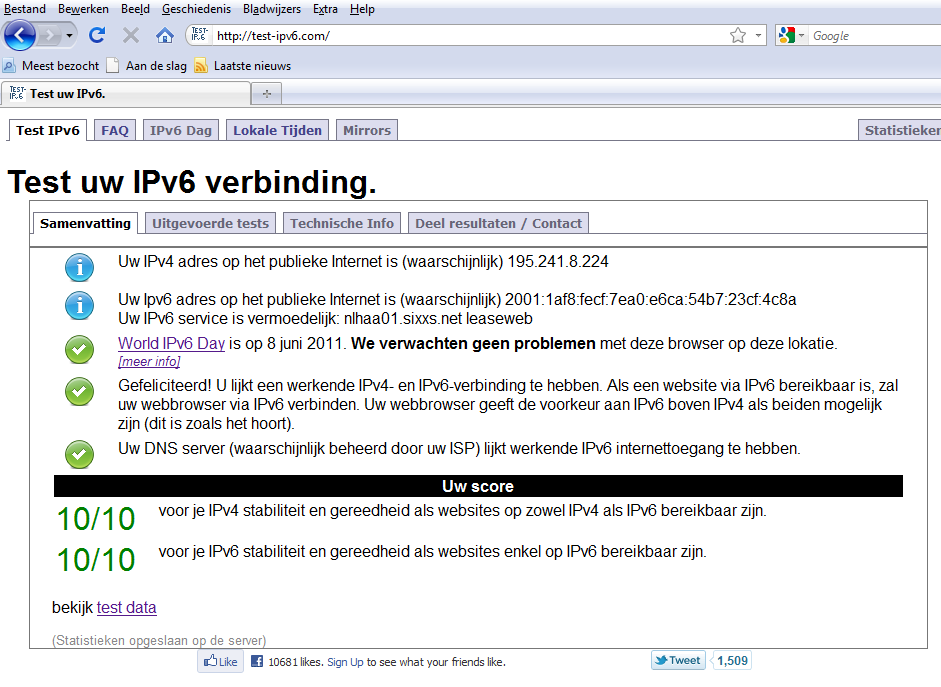
Now restart dnsmasq. When you test clients, you can see in the logs that Windows7 uses DHCPv6 to configure the network, but Android devices use SLAAC to configure the network. To test computers connected to your Home Server, surf to http://test-ipv6.com/ and check that dual stack IPv4 and IPv6 works:
ipv6-test